Visily
AI-powered UI design tool that turns prompts, screenshots, or sketches into editable wireframes and mockups.
Tool Screenshot
My Video On This Tool

Similar Tools
AI-powered UI design tool that turns prompts, screenshots, or sketches into editable wireframes and mockups.
Tool Screenshot
My Video On This Tool
Similar Tools
Overview
Visily is a browser-based AI UI design platform that converts text prompts, screenshots, sketches, and diagrams into editable wireframes, high-fidelity mockups, and interactive prototypes. Built for speed and simplicity, Visily lets you go from idea to interface within minutes, without the steep learning curve of traditional design tools like Figma.
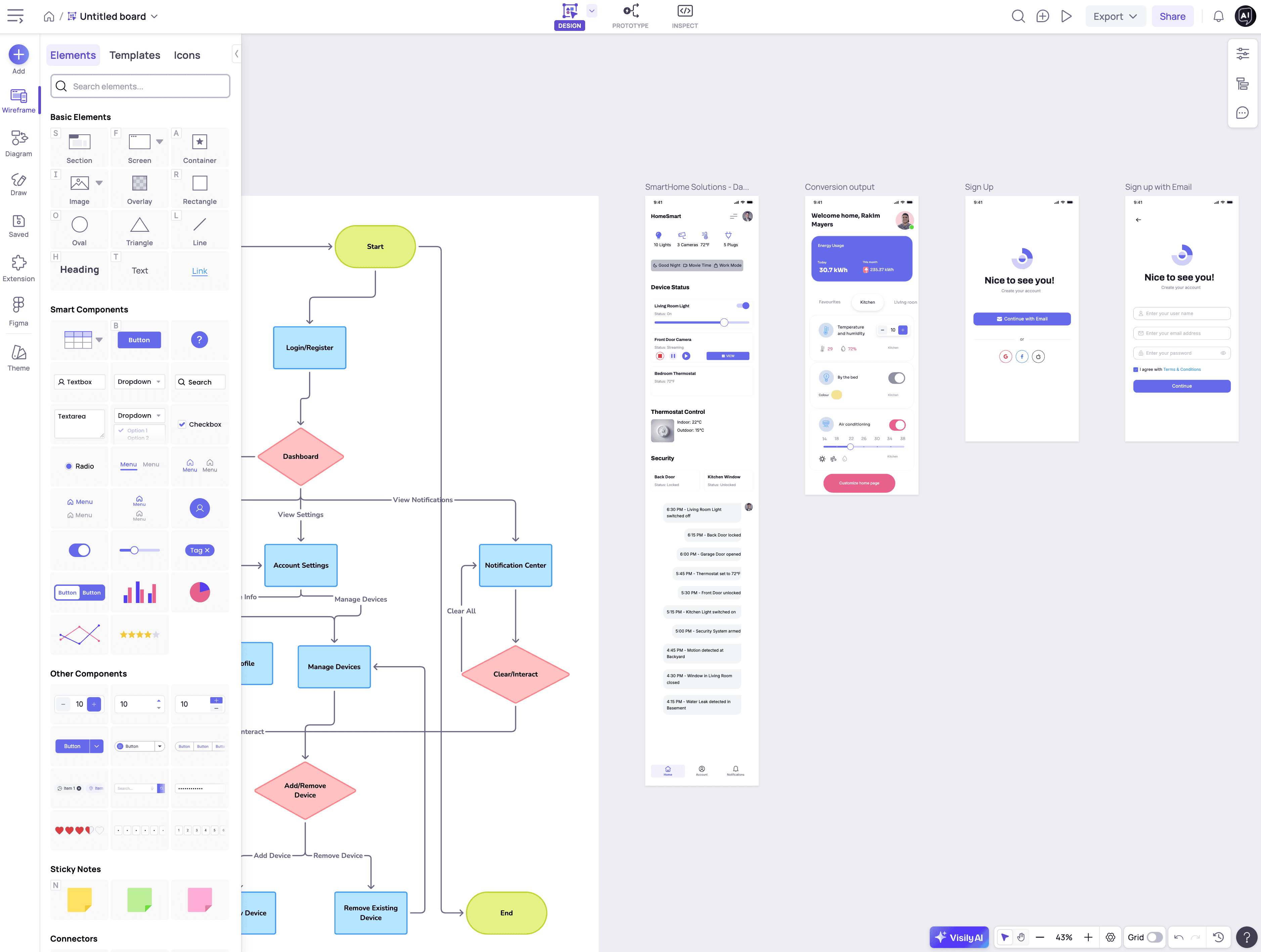
Visily combines AI generation with a smart drag-and-drop editor, so you can produce polished UI designs even if you have zero design experience. Every selected element triggers a contextual toolbar with relevant settings (colors, sizing, states, padding), which keeps the interface clean while giving you surprisingly deep control over individual components.
Beginners in UI/UX design who want a low learning curve and fast results
Non-designers (product managers, founders, business analysts, developers) who need to visualize ideas without learning Figma
Professional designers looking to speed up early wireframing, ideation, and stakeholder alignment
Cross-functional teams that want everyone, not just the designer, contributing to the design process
Startups and educators who need to create mockups, prototypes, and flowcharts without heavy tooling
AI Generation Features
Text to Design: Generate full app or web screens from a simple natural-language prompt
Text to Diagram: Build user flows, journeys, flowcharts, and sitemaps from a short description
Screenshot to Design: Upload any UI screenshot and convert it into fully editable elements
Sketch to Design: Turn hand-drawn sketches into digital UI layouts
Magic Theme: Generate color palettes and fonts from a website URL, an image, or keywords
Magic Image: AI-powered image search that understands your design context
Smart Data Fill: Auto-populate tables with realistic names, emails, dates, job titles, and more
Design and Editing Features
Contextual toolbar that adapts to every selected element
Smart Components: tables, sliders, switches, tab bars, charts, dropdowns, and more (all with built-in states and styles)
Lo-Fi / Hi-Fi switcher to toggle between wireframe and high-fidelity views
1,500+ customizable templates covering full flows (login, onboarding, dashboards, profiles)
Icon library with multiple icon packs included
Free image integration with Pexels and Unsplash
Accessibility and Handoff
Color Assistant: real-time suggestions for contrast, legibility, and WCAG accessibility compliance
Basic prototyping for page-to-page navigation
Export to Figma (via official plugin, preserves auto layout)
Export to React, Vue, and HTML code
Export to PDF, PNG, JPG, and CSS properties
Collaboration
Real-time co-editing, comments, cursor chat, and follower mode
Shared libraries and saved components for team consistency
Guest viewer and editor access (Pro plan)
Visily offers a free Starter plan with AI and template credits, making it easy to test before committing. The Pro plan starts at $11/editor/month (billed annually) or $14/month (billed monthly), which is competitively priced against Figma plus FigJam combined. A Business plan is available at $29/editor/month for larger teams, with a custom Enterprise tier for companies needing enhanced security.
Use Visily when you want to: skip the blank canvas, quickly prototype a mobile or web app, align stakeholders around a shared vision, generate a starter UI for a product concept, or hand off clearer specs to developers without waiting on a dedicated designer.